

Koho has entered a new phase of product development.
We’ve always focused on building powerful functionality, but more recently the emphasis has shifted. Customers told us the platform was doing the right things, but they wanted it to be clearer, easier to navigate, and better embedded into day-to-day workflows.
This release is the first step in a broader overhaul of the Koho user experience, shaped directly by customer feedback.
Here’s what’s new.
A simpler, clearer navigation experience
We’ve introduced a new navigation bar to make Koho significantly easier to use. It’s quicker to get where you need to be, clearer how different areas of the platform fit together, and far more intuitive for new users.
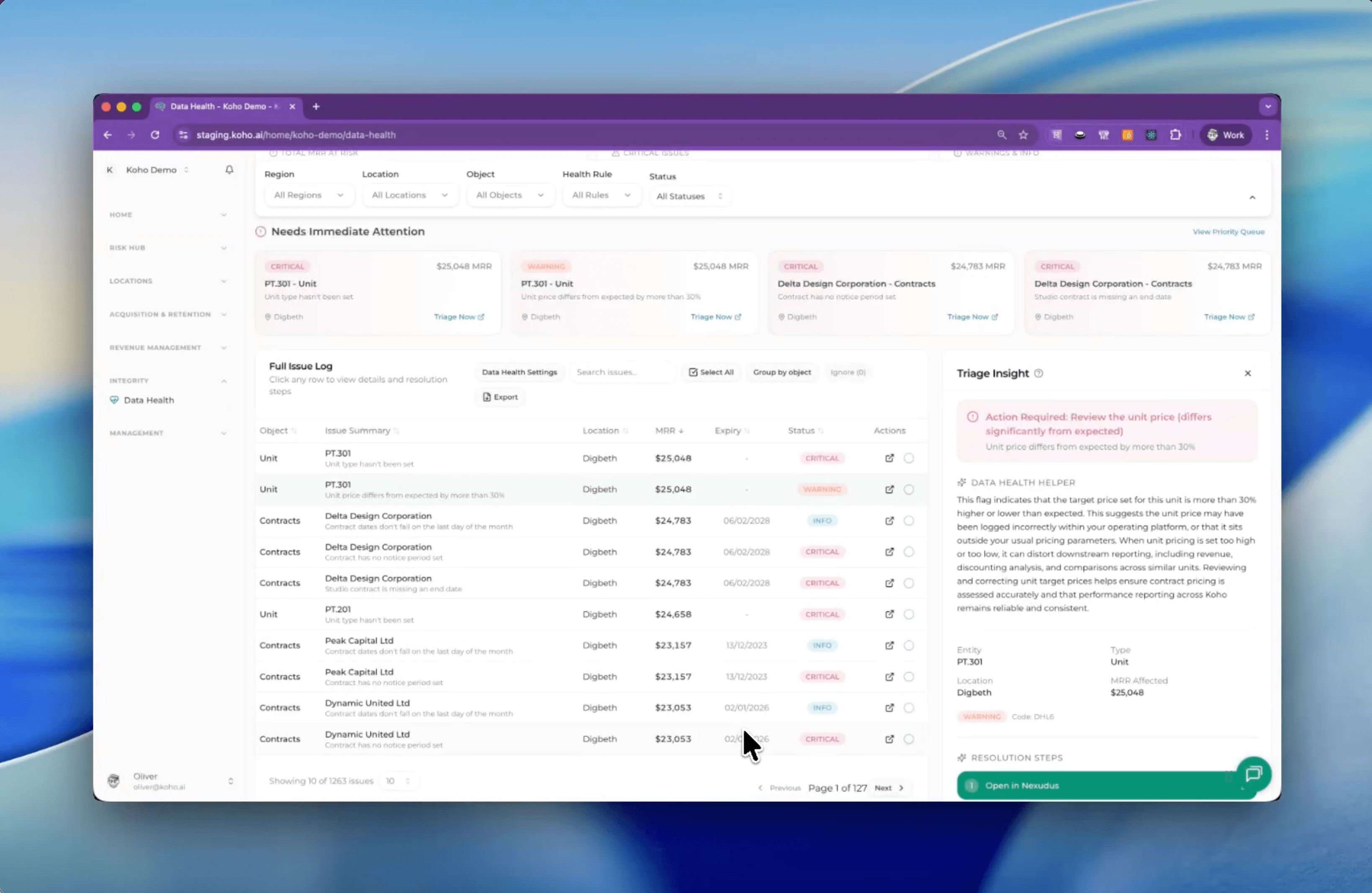
A rebuilt Data Health experience
The Data Health section has been completely overhauled.
It now:
- Shows you exactly where data issues exist
- Explains why they matter
- Takes you directly to the source system to fix them
- Tells you precisely what needs to be done when you get there
This isn’t visibility for visibility’s sake. It’s about helping teams resolve issues faster and trust the data they’re working with.
Community Priorities - your day, clearly mapped
We’ve launched the first of several role-specific pages, starting with Community Priorities.
This page is designed to answer a simple question: what should I focus on today?
It breaks work down into clear, logical components so community and operations teams know where to direct their attention to retain members and prepare for the week ahead.
This is the beginning of a broader move towards role-focused experiences inside Koho.
WIN export - industry benchmarking made easy
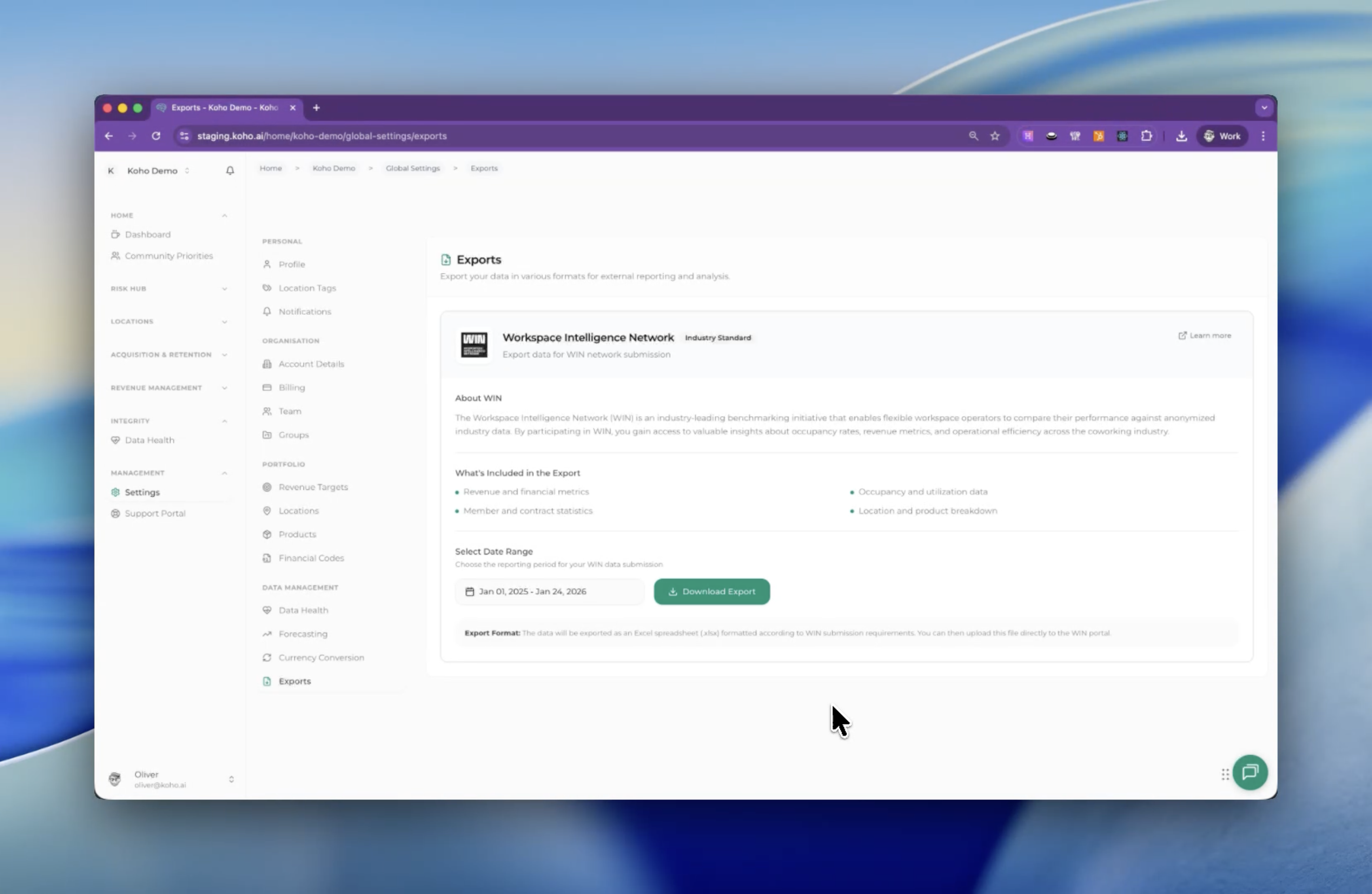
Submitting data to the Workspace Intelligence Network has never been easier.
Koho now lets you export everything you need in a couple of clicks:
- Select your reporting period
- Click export
- Upload directly to WIN
No manual wrangling. No reformatting. Just clean, ready-to-use data.
Grouped financial codes across locations
Many operators end up duplicating financial codes across locations, which quickly becomes unmanageable at portfolio scale.
You can now group and tag financial codes so you get a single, consistent view of revenue by product line across all locations. Less noise, more clarity.
Major upgrades to scenario planning
We’ve made several meaningful improvements to scenario planning, based directly on how customers are using it in practice.
Key enhancements include:
- Merging individual location plans into a single portfolio-level view
- Allowing multiple team members to work independently and combine their scenarios
- Updating source data after a plan has been created, without losing structure
Scenario plans now stay live. Contract and pipeline updates flow through automatically, removing the need for spreadsheets, copying, pasting, or reconciliation across tools.
The result is bottom-up forecasting that’s actually usable day to day.
What’s next
There’s a lot more coming over the next few weeks and months, some of which we’re especially excited about sharing with you.
We’ll be sharing regular feature updates like this going forward, alongside a more detailed changelog for smaller, technical releases as they ship.
As always, feedback is welcome. Let us know what’s working, what isn’t, and what you’d like to see next.